
Scan & Check Lottery Results Instantly
Overview
ตรวจหวย Lottery QR Code is a dedicated mobile application designed to simplify the process of verifying lottery ticket results. Built for iPhone users, the app enables quick and accurate validation of lottery entries by scanning QR codes printed on tickets. This functionality eliminates manual number matching, reducing errors and saving time. The app is particularly useful for individuals who regularly participate in lottery draws and want immediate confirmation of their results.
Targeted at casual and frequent lottery players, the software serves as a digital companion for tracking both current and historical draws. It supports real-time access to winning numbers, ensuring users stay updated regardless of location. The app also maintains a digital record of past checks, which can be useful for reviewing patterns or verifying results over time. While the developer, Supaporn Wongcocum, is identified, no additional background information about the company or development team is available.
Real-world usage includes checking results immediately after a draw, reviewing past winning combinations, and tracking personal lottery history. The app’s focus on QR code integration provides a streamlined experience for users who prefer automated verification over traditional methods.
Key Features & Capabilities
- QR Code Scanning for Instant Results – Users can scan the QR code on their lottery ticket to instantly verify if it matches the winning numbers, reducing the need for manual comparison.
- Current and Past Lottery Results – The app provides access to both the latest draw results and historical data, allowing users to check results from previous weeks or years.
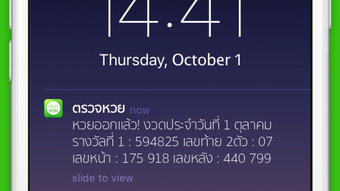
- Real-Time Notifications – Users receive immediate alerts as soon as new winning numbers are published, ensuring they never miss a draw.
- Cloud-Based History Storage – All lottery checks are saved securely in the cloud, enabling users to access their checking history from any device linked to their account.
- Statistical Analysis Tools – The app offers insights into past winning numbers, including frequency data for the last two and three digits, supporting informed decision-making for future entries.
These features collectively enhance user experience by minimizing effort and maximizing accuracy. For example, a user can scan a ticket right after a draw and receive confirmation within seconds. The cloud storage function ensures that even if a device is lost or replaced, past checks remain accessible. Statistical tools may help users identify trends, although the app does not claim predictive capabilities.
User Interface, Workflow & Performance
The application features a clean, intuitive interface optimized for iPhone’s touch-based navigation. Core functions such as scanning, viewing results, and accessing history are accessible through a streamlined menu system. The workflow is designed for minimal steps: open the app, scan the QR code, and receive instant feedback.
Navigation is consistent across screens, with clearly labeled buttons and visual indicators for success or failure in matching results. The app’s performance is expected to align with standard iOS app behavior, though specific resource usage details were not provided. The developer did not specify CPU or RAM consumption, so general assumptions about efficiency are based on typical mobile app patterns.
Stability appears to be a focus, given the app’s core function of delivering timely results. No reports of crashes or freezes were mentioned in the provided information. The user experience is designed to be smooth and responsive, especially during the scanning process, which is critical for real-time feedback.
Compatibility & System Requirements
The software is designed exclusively for iPhone devices, with no information available on specific iOS versions or hardware requirements. The installation size is listed at 15.4 MB, indicating a lightweight footprint suitable for most iPhone models.
Exact system requirements were not listed. Compatibility information is limited to the platform, which is iPhone. Users should ensure their device runs a compatible version of iOS, though the exact version is not specified. The app’s reliance on QR code scanning suggests it requires access to the device’s camera, which is standard on all modern iPhones.
Pros and Cons
Pros
- Instant verification of lottery tickets via QR code scanning
- Real-time notifications for new draw results
- Cloud storage for tracking checking history
- Access to current and past lottery results
- Statistical insights for recent winning numbers
Cons
- No information on supported iOS versions or minimum hardware requirements
- Performance and resource usage details not provided
- App is limited to iPhone, with no support for other platforms
- Relies on external lottery data sources, which may affect accuracy
FAQ Section
Is ตรวจหวย Lottery QR Code available for Android devices?
The app is currently available only for iPhone users. There is no information on Android support at this time.
Is the app free to download and use?
Yes, ตรวจหวย Lottery QR Code is available as a free app with no in-app purchases or subscription fees.
Does the app require an internet connection?
Yes, an active internet connection is required to access lottery results, receive notifications, and sync data to the cloud.
Can I view past lottery results using the app?
Yes, the app provides access to both current and historical lottery results, including data from previous years.
Is my lottery checking history secure?
The app stores checking history in the cloud, which implies some level of data protection. However, specific security measures were not detailed in the provided information.
Final Thoughts
ตรวจหวย Lottery QR Code delivers a focused, efficient solution for iPhone users who want to verify lottery tickets quickly and reliably. Its QR code scanning feature, combined with real-time alerts and cloud-based history, sets it apart from basic result lookup tools. While platform limitations and missing technical details prevent a full assessment of performance and compatibility, the app’s core functionality is clear and well-executed.
It is ideal for individuals who play the lottery regularly and value convenience, speed, and record-keeping. The inclusion of statistical data adds a layer of engagement for users interested in analyzing trends. For those seeking a simple, free way to check lottery results on their iPhone, this app offers a compelling option.
Download ตรวจหวย Lottery QR Code now







